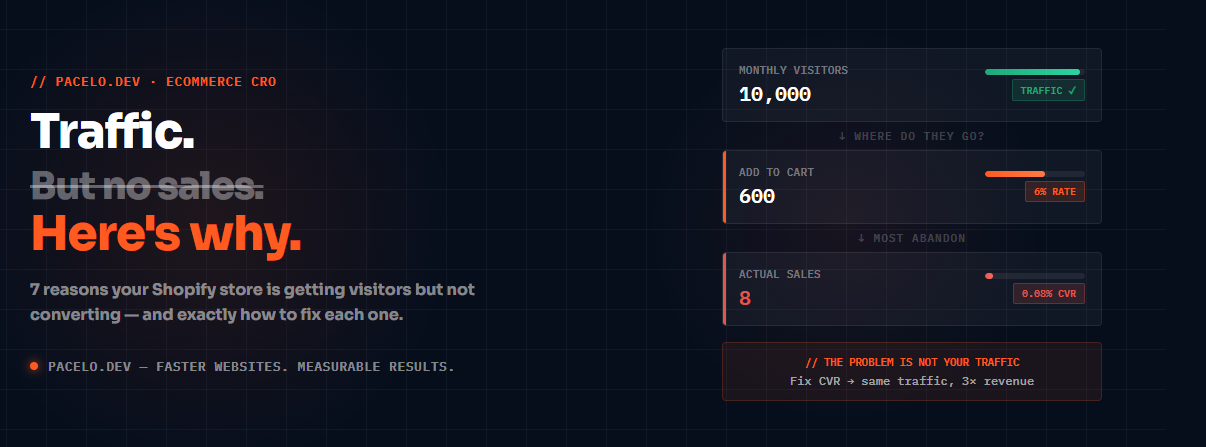
<p>You're getting visitors. Your ads are running. Google Analytics shows people landing on your store every day. But sales? Almost nothing.</p>
<p>This is one of the most frustrating situations in ecommerce — and it's more common than you think. The good news: traffic without sales is almost always a fixable problem. And once you know where to look, the fix is usually faster than you expect.</p>
<p>Here's exactly why your Shopify store gets traffic but no sales — and what to do about it.</p>
<hr>
<h2>First: Traffic Without Sales Is a Conversion Problem, Not a Traffic Problem</h2>
<p>Before spending another dollar on ads, understand this: more traffic to a broken store just means more people leaving without buying.</p>
<p>If your conversion rate is 0.5% and you're getting 1,000 visitors a month, you're making 5 sales. Double your traffic to 2,000 visitors and you make 10 sales — but you've also doubled your ad spend.</p>
<p>Fix your conversion rate to 2% first, and those same 1,000 visitors make you 20 sales. Same traffic, 4× the revenue, zero extra ad spend.</p>
<p>That's why conversion rate optimization (CRO) always comes before scaling traffic.</p>
<hr>
<h2>The 7 Real Reasons Your Shopify Store Gets Traffic But No Sales</h2>
<h3>1. Your Page Loads Too Slowly</h3>
<p>This is the most overlooked conversion killer. If your Shopify store takes longer than 3 seconds to load on mobile, you're losing over 50% of visitors before they even see your products.</p>
<p>Google research shows that for every 1-second delay in mobile load time, conversions drop by up to 20%.</p>
<p>Check your store right now at <a href="https://pagespeed.web.dev/" target="_blank" rel="noopener">PageSpeed Insights</a>. Run the mobile test. If your score is below 50, your speed is actively killing your sales.</p>
<p><strong>The fix:</strong> Compress your hero image to WebP, defer non-critical JavaScript, remove unused Shopify apps. A properly optimized Shopify store loads in under 2 seconds and scores 90+ on mobile PageSpeed.</p>
<h3>2. Wrong Traffic — You're Attracting People Who Will Never Buy</h3>
<p>Not all traffic is equal. If you're running broad Facebook ads or targeting the wrong keywords, you might be getting thousands of visitors who were never going to buy.</p>
<p>Signs your traffic is wrong:</p>
<ul>
<li>Bounce rate above 70%</li>
<li>Average session duration under 30 seconds</li>
<li>People landing on your homepage instead of product pages</li>
<li>High click-through rate on ads but zero conversions</li>
</ul>
<p><strong>The fix:</strong> Narrow your audience. Target people who have already searched for your specific product. Use Google Shopping ads over broad Facebook interests. Send ad traffic to specific product pages, not your homepage.</p>
<h3>3. Your Product Page Doesn't Answer the Right Questions</h3>
<p>Most Shopify product pages fail at the most basic job: convincing a stranger to hand over money.</p>
<p>Visitors arrive with questions. Your product page needs to answer all of them before they ask:</p>
<ul>
<li>What exactly is this product?</li>
<li>Why is it better than the alternatives?</li>
<li>Will it work for my specific situation?</li>
<li>What do other people think of it?</li>
<li>What happens if it doesn't work out?</li>
</ul>
<p>If your product page is just a few photos and a short description, you're leaving most of these unanswered.</p>
<p><strong>The fix:</strong> Rewrite your product descriptions to address objections directly. Add social proof (reviews, photos from real customers). Make your return policy prominent. Add a size guide, comparison chart, or FAQ block directly on the product page.</p>
<h3>4. You Have No Social Proof</h3>
<p>People don't trust stores they've never heard of. The fastest way to build trust is showing that real people have already bought from you and are happy.</p>
<p>If your store has no reviews, no user photos, no trust badges — visitors assume risk and leave.</p>
<p><strong>The fix:</strong> Install a review app (Judge.me is free and excellent). Email your past customers and ask for reviews. Display review count prominently on product pages. Add trust badges (secure checkout, money-back guarantee) near your Add to Cart button.</p>
<h3>5. Your Checkout Is Creating Friction</h3>
<p>Cart abandonment rate on Shopify averages around 70%. That means 7 out of 10 people who add something to their cart leave without buying.</p>
<p>Common checkout friction points:</p>
<ul>
<li>Forcing account creation before purchase</li>
<li>Too many form fields</li>
<li>Unexpected shipping costs appearing at checkout</li>
<li>No guest checkout option</li>
<li>Slow checkout page load time</li>
</ul>
<p><strong>The fix:</strong> Enable guest checkout. Show shipping costs on the product page — never surprise people at checkout. Reduce form fields to the minimum required. If you're on Shopify Plus, use Checkout Extensibility to customize the flow.</p>
<h3>6. Your Pricing or Value Proposition Is Unclear</h3>
<p>If visitors can't immediately understand why your product is worth the price, they'll leave and buy from Amazon instead.</p>
<p>This doesn't mean you need to be the cheapest. It means you need to clearly communicate what makes your product worth what you're charging.</p>
<p><strong>The fix:</strong> Add a clear value proposition above the fold on your product pages. Use comparison tables to show what you offer vs. cheaper alternatives. If you're premium-priced, lean into it — explain the craftsmanship, materials, or guarantee that justifies the price.</p>
<h3>7. You're Not Following Up With Abandoners</h3>
<p>Most visitors won't buy on their first visit. That doesn't mean they're lost forever.</p>
<p>If you have no abandoned cart email sequence, no browse abandonment flow, and no retargeting ads — you're letting warm leads go cold permanently.</p>
<p><strong>The fix:</strong> Set up Shopify's built-in abandoned checkout emails (Settings → Notifications). Install Klaviyo or Omnisend for a proper 3-email abandoned cart sequence. Run retargeting ads on Meta targeting people who visited product pages but didn't buy.</p>
<hr>
<h2>How to Diagnose Your Specific Problem</h2>
<p>Before fixing everything at once, find out which of these is your biggest issue:</p>
<ol>
<li><strong>Check your PageSpeed score</strong> — if it's below 50 on mobile, start there</li>
<li><strong>Check your bounce rate in Google Analytics</strong> — above 70% means traffic or landing page problem</li>
<li><strong>Check your add-to-cart rate</strong> — below 3% means product page problem</li>
<li><strong>Check your checkout abandonment rate</strong> — above 70% means checkout friction</li>
<li><strong>Check your returning visitor conversion rate vs new visitor</strong> — big gap means trust problem</li>
</ol>
<p>Fix the biggest number first. Don't optimize your checkout if nobody is even adding to cart.</p>
<hr>
<h2>Real Example: What Fixing These Issues Actually Delivers</h2>
<p>On a recent Shopify rebuild for Radeant, a haircare ecommerce brand, we identified two core problems: a PageSpeed score of 38 on mobile, and a product page that didn't adequately explain the bundle offer.</p>
<p>After fixing both — rebuilding the theme for speed, adding a custom bundle builder, and redesigning the product page — the results were:</p>
<table>
<thead>
<tr><th>Metric</th><th>Before</th><th>After</th></tr>
</thead>
<tbody>
<tr><td>PageSpeed Score</td><td>38</td><td>96</td></tr>
<tr><td>LCP (load time)</td><td>5.0s</td><td>2.0s</td></tr>
<tr><td>Conversion Rate</td><td>1.0×</td><td>3.1×</td></tr>
</tbody>
</table>
<p>Same traffic. Same products. Same price. Just a faster, clearer store — and conversion rate tripled.</p>
<hr>
<h2>Where to Start Today</h2>
<p>If you're getting traffic but no sales, do these three things in order:</p>
<ol>
<li>Run your store through <a href="https://pagespeed.web.dev/" target="_blank" rel="noopener">PageSpeed Insights</a> on mobile. Note your LCP score.</li>
<li>Open Google Analytics → Behavior → check bounce rate and average session duration on your top landing pages.</li>
<li>Walk through your own checkout as a customer. Count every step and every form field. Remove anything that isn't essential.</li>
</ol>
<p>You'll find at least one obvious problem within 10 minutes. That's your starting point.</p>
<hr>
<h2>Want Us to Find Your Specific Conversion Killers?</h2>
<p>We offer a free 15-minute site audit where we pull up your live PageSpeed score, look at your product page structure, and identify the top 2–3 things that are costing you sales right now.</p>
<p>No charge. No obligation. You keep the findings whether you hire us or not.</p>
<p><a href="https://cal.com/arsalanpacelo/15min" target="_blank" rel="noopener"><strong>Book a free Shopify conversion audit →</strong></a></p>
<p>Or email: <a href="mailto:arsalan@pacelo.dev">arsalan@pacelo.dev</a></p>
<hr>
<h2>Summary: Why Your Shopify Store Gets Traffic But No Sales</h2>
<ol>
<li>Your page loads too slowly — fix PageSpeed first</li>
<li>Wrong traffic — narrow your audience targeting</li>
<li>Product page doesn't answer buyer questions</li>
<li>No social proof — add reviews and trust badges</li>
<li>Checkout friction — enable guest checkout, remove surprises</li>
<li>Unclear value proposition — explain why your product is worth the price</li>
<li>No follow-up — set up abandoned cart emails and retargeting</li>
</ol>
<p>Start with your PageSpeed score. Everything else is easier to fix once your store loads fast.</p>
<hr>
<p><em>Arsalan Ahmad is the founder of <a href="https://pacelo.dev" target="_blank" rel="noopener">Pacelo</a> — a performance-first Shopify and WordPress agency. Top Rated Plus on Upwork with a 100% Job Success Score.</em></p>
Want us to fix this for you?
Book a free 15-minute site audit. We pull up your live PageSpeed score and show you exactly where you’re losing sales — no charge, no obligation.
Book a free audit →